Replying to text messages can become a strenuous task if you are among those few who are not comfortable adjusting to your phone’s keyboard (more so if you have large fingers). Well MobiTexter could be just the app that you need.
MobiTexter allows Android users to extend their texting capabilities by enabling them to reply SMS messages from the PC.
After you install the application on phone, you are required to Sign in to your Google Account after which you can take over from your PC. From your PC, MobiTexter asks the access to your Google account( contact information). After the permission is granted, the site links you to the texting tools.
MobiTexter does not have anything fancy going around at least in terms of the looks but it provides just the right amount to tools to ease your texting experience.
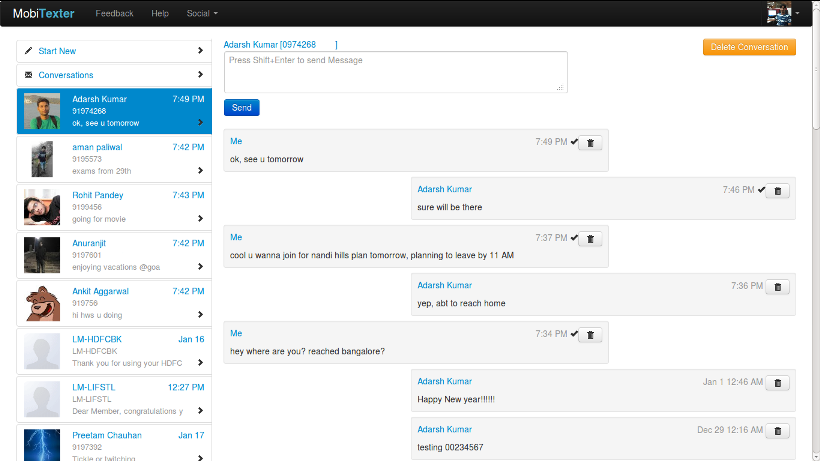
Once you log in, it automatically pulls in the most recent text messages which is displayed on the right side. It also provides you with the function of adding a new individual or to start a group chat.
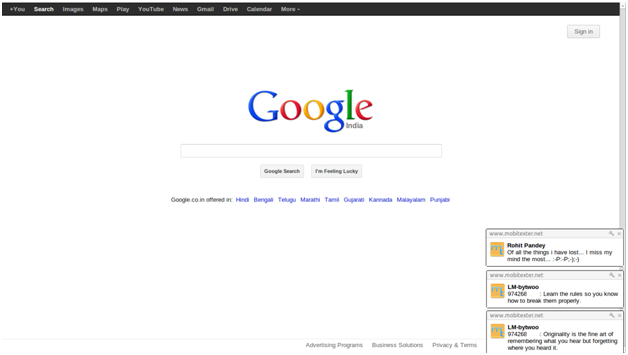
Another cool feature of this application is the Desktop Notification which allows the users to receive the text notification right at the desktop i.e. you don’t have to keep a check regularly for new notifications if there are new notifications it will pop on your desktop.
The character limit for a single message remains to be 160 characters similar to many applications available online. You can type more than 160 characters but it starts a new message each time the text limit is breached.
The application is very much like using a text messaging app on mobile phone as it adds the incoming messages into threads much like we see on our phones . A potential drawback of the app would be the lack of MMS support.Since the application is used on PC, it would have been handy if there was an option to send/receive images & videos but unfortunately MobiTexter does not allow that feature as of now.
On Google Playstore, the review of the MobiTexter is on the positive side as with 4.5 stars . The application has performed well on the devices and users seem satisfied with the performance of the application.
Do give MobiTexter a try and let us know what you think.
We built one platform. They experience six. I thought I understood how our data platform…
India’s startup journey has moved quickly. In just the last decade, it has grown into…
The advancement of artificial intelligence from an experimental stage to a significant driving force has…
The Tech Panda takes a look at recent tech launches. Cybersecurity: Commercial Launch of Embedded…
Telecom operators are entering a pivotal phase, where their future role in the AI economy…
In global financial system, while traditional banks once dominated the flow of credit and capital,…
View Comments
Thanks Pintu for the review.